Vulnerability scanning with Wordfence CLI
According to a recent study by Patchstack and Sucuri, almost 8,000 new vulnerabilities were found in the WordPress ecosystem in 2024, and over 6,700 vulnerabilities in the first half of 2025. The vast majority were found in plugins.
Keeping everything up to date is a great security habit, however it is not always possible. Newer versions might have new bugs getting in the way, or conflicts with other plugins. They may have new features you never asked for, or remove ones you heavily rely on. They may also be abandoned and not have any updates at all.
In this lesson we'll look at WordPress vulnerability scanning using the free Wordfence CLI utility. This will help identify plugins and themes that require attention.
Why CLI
Wordfence is one of the most popular security plugins for WordPress, and has a free version available. Patchstack is another good (but pricey) option. If you prefer GUIs, they're both quite suitable, especially in shared environments with restricted access.
However, when you're hosting WordPress on your own server, you have the flexibility of using any tools you like, which may be a better fit for existing workflows and monitoring systems.
Such tools often provide significantly better performance, since they are no longer running in PHP via HTTP requests, and can utilize all available system resources in a much more efficient way, like multi-threading. These tools can be used on sites that are already compromised, local, backups, or offline copies.
Wordfence CLI
Wordfence CLI is an open source security scanner written in Python. It uses the same Wordfence vulnerability database as the plugin does. In addition to plugin and theme vulnerabilities, Wordfence CLI can also scan for malware, although the free version has a 30 day delay on signatures.
The Wordfence CLI utility only provides information about vulnerable files. It does not patch these files, nor does it act as a firewall. Updating the vulnerable plugins or firewall rules is ultimately your responsibility.
Installing Wordfence CLI
The Wordfence CLI GitHub repository ships pre-built binaries for Linux, and convenience packages for Debian/Ubuntu and Red Hat distributions. Let's use the .deb package to install the utility on our Ubuntu server along with some dependencies:
sudo apt install -y python3-pymysql libpcre3
wget https://github.com/wordfence/wordfence-cli/releases/download/v5.0.2/wordfence.deb
sudo dpkg -i wordfence.deb
rm wordfence.deb
When you run wordfence for the first time, it will prompt you for a quick
setup, where you can specify a cache directory and request a free license. After
setup, you should be able to use all the CLI features:
wordfence --help
There are quite a few options available, but the ones we're interested in most
are the vuln-scan and malware-scan commands.
Running a vulnerability scan
Let's run a vulnerability scan across all our sites. Wordfence CLI can
recursively detect WordPress sites from pretty much any given directory, so
giving it the entire /sites directory will work:
wordfence vuln-scan /sites
I don't recommend installing outdated plugins, however I think it's okay to do so for testing vulnerability scanning. I installed a very old version of WooCommerce on my test site and here's the output from Wordfence CLI:
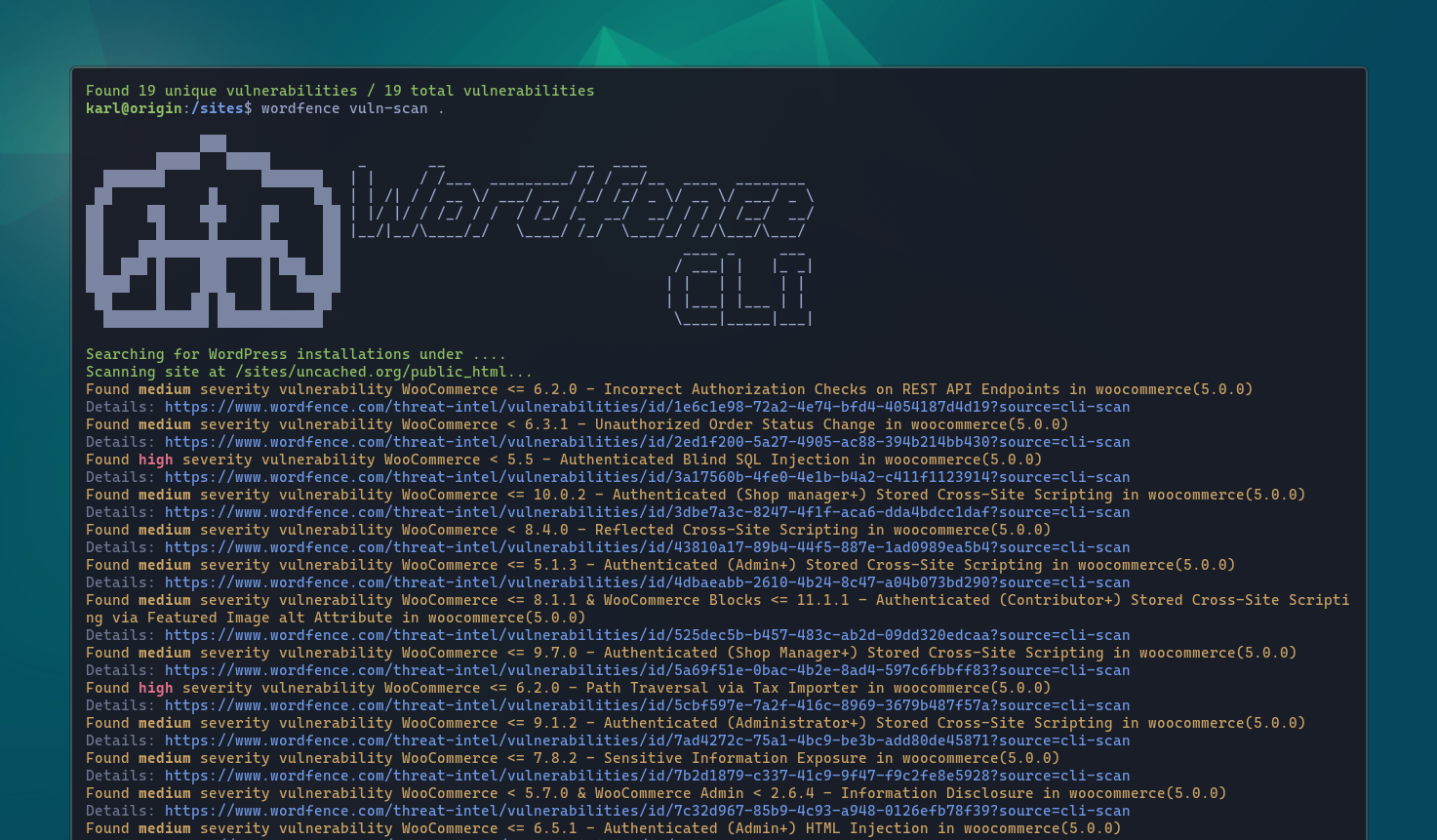
This report includes the plugin name and version, along with the severity and some details about the vulnerability. The link contains more details, attributions, and remediation steps.
You can also scan individual sites, backups, and more. We'll also look at
integrating Wordfence CLI with monitoring in a later module in this course,
however the CLI also supports an --email argument which can come in handy for
simpler setups:
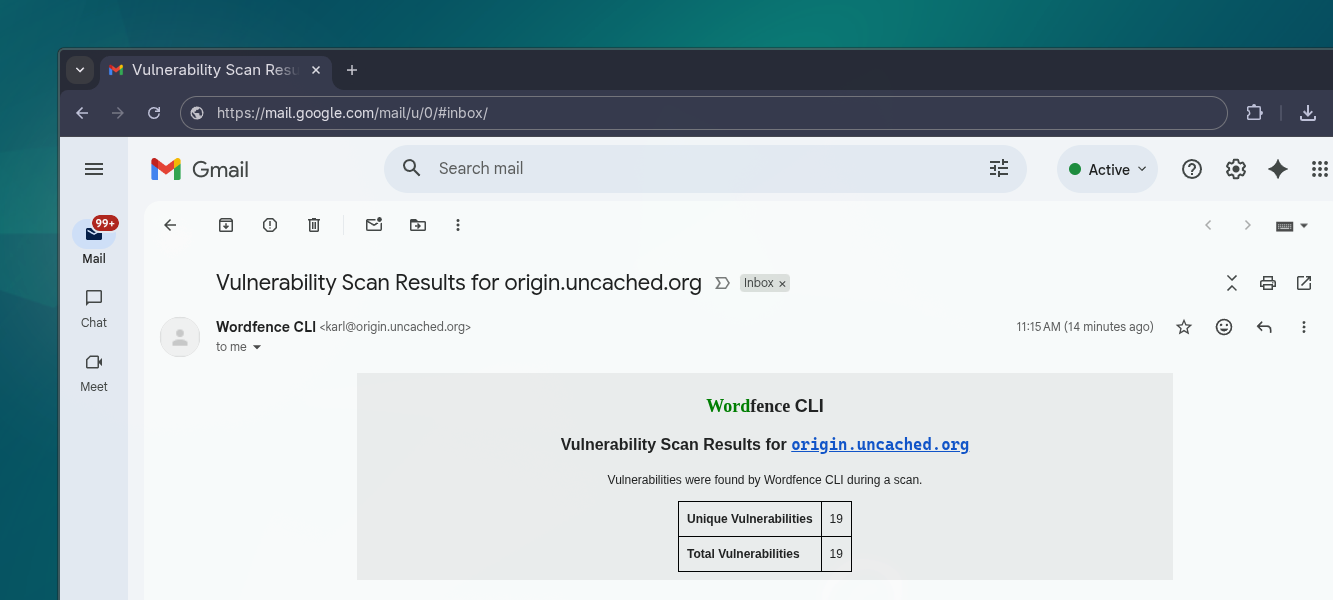
You'll need a local mail relay configured for
Wordfence to be able to quickly deliver email reports, or use the --smtp-*
arguments to have it speak to an external host.
Running a malware scan
Similar to a vulnerability scan, the Wordfence CLI can perform a malware scan:
wordfence malware-scan /sites
This report includes the infected file locations and details about the matched malware. There may be false positives and each infected file should be looked at individually.
Note that the free version uses signatures that may lag behind for up to 30 days, so newer malware might not be detected. ClamAV is a great alternative for general malware and virus scanning, as well as YARA with WordPress and PHP malware YARA rules published by Pressidium.
Running with cron
You can run the Wordfence CLI vulnerability and malware scans on a schedule using cron. Here's an extract from my /config/misc/crontab file:
# Wordfence vulns & malware
0 1 * * * wordfence vuln-scan /sites --email [email protected]
0 2 * * * wordfence malware-scan /sites --email [email protected]
This runs a vulnerability scan across all sites at 01:00 UTC, and a malware scan across all sites at 02:00 UTC. Note that the malware scan typically takes significantly longer, since it actually needs to read files and do pattern matching, rather than just version matching.
This article is for premium members only. One-time payment of $196 unlocks lifetime access to all existing and future content on wpshell.com, and many other perks.